Kitcha: Recipe & Meal Planner
- 4.7
- Rating
- 10.00K
- Installs
- Free
- Price

 Analysis by App-foxy
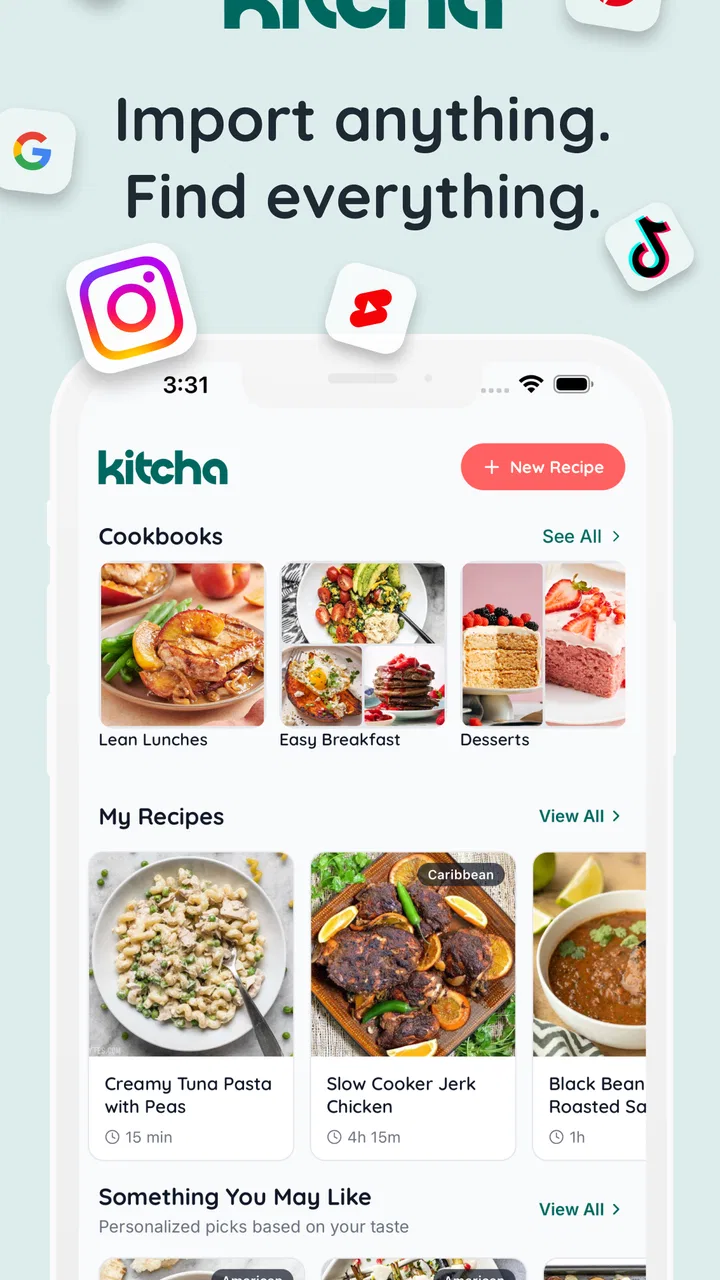
I started using Kitcha: Recipe & Meal Planner with a simple goal: spend less time jumping between recipe pages and more time actually deciding what to cook. It is a free food and drink app from FireKamp that brings saved recipes, meal planning, shopping preparation, and nutrition tracking into one place. That combination sounds familiar at first, but the useful part is how these tasks connect. A recipe is not only something to read once; it can become part of a plan, influence a grocery list, and help me understand the shape of my week.
My overall impression is positive, though I would not treat it as a complete replacement for every cooking tool. It works best for people who collect recipes online and need a calmer way to turn that collection into actual meals. It is less compelling for someone who only cooks from a small handwritten rotation, dislikes entering or organizing information, or wants a highly specialized nutrition service. The app has a 4.7 average from around 850 ratings and more than 10K installs, which suggests that its focused approach is connecting with a growing group of home cooks.
What Kitcha feels like in everyday use
The central idea is straightforward: save recipes from websites, then use them as building blocks for planning. In practice, that changes the way I think about online recipes. Instead of leaving useful pages scattered across browser tabs, bookmarks, messages, and screenshots, I can treat them as a personal cooking library. The benefit is not just tidiness. A saved recipe becomes easier to bring back when I am planning several days at once.
You May Also Like

 AccuWeather: Weather Radar
AccuWeather Review: A Quick, Clear Forecast for Everyday Decisions
For everyday plans, the best forecast is the one you can understand quickly. AccuWeather makes rain timing, radar, and local conditions easy to act on, with a few trade-offs.

 Hill Climb Racing
Why Hill Climb Racing Still Turns Crashes Into One More Run
A tiny car, a bumpy hill and one more upgrade: Hill Climb Racing keeps resurfacing because its simple chaos makes every near-miss feel personal.

 AliExpress - Shopping App
AliExpress Makes Global Shopping Feel Personal, but Shoppers Bear the Risk
AliExpress turns a global marketplace into a pocket-sized discovery engine. Its reach is useful, its shopping loop compelling, and its trade-offs easy to miss.

 Lords Mobile: Kingdom Wars
Lords Mobile Is a Kingdom-Building Routine, Not a Quick Match
A case-by-case verdict on the building, battles, device demands, and social commitments that make Lords Mobile rewarding for some players and exhausting for others.

 PDF Scanner app - TapScanner
TapScanner Makes Paperwork Easier to Capture, Check, and Share
TapScanner makes scanning with a phone feel less like a rescue operation and more like a dependable step in getting work done. Its capture tools are useful, though not flawless.

 Block Blast!
 Shows How Much a Puzzle Game Can Leave Out
A quiet grid game shows why puzzle players increasingly value instant clarity, repeatable skill and low-pressure play—and where the genre still needs to catch up.
More From Our News Desk
View All News


A realistic example is a busy Sunday afternoon. I might save a soup, a rice dish, and a tray-bake recipe during the week. Rather than deciding from scratch every evening, I can look at those choices together, place them into a meal plan, and prepare a grocery list around them. That small shift removes one of the most tiring parts of cooking: repeatedly answering the question of what dinner should be.
The app is particularly suited to people who discover food through websites rather than relying on a single recipe source. It gives those discoveries a more practical destination. I also found that the planner encourages more deliberate choices. When I can see several planned meals together, I am more likely to notice repeated ingredients, balance heavier meals with simpler ones, and avoid saving recipes that I will never realistically make.
There is a trade-off, however. A recipe collection is only useful if I maintain it. Saving everything without deciding what I genuinely want to cook can create another form of clutter. My best results came from treating Kitcha as an active kitchen notebook rather than a passive archive. After trying a recipe, I would keep it in mind for future planning; recipes that looked attractive but did not suit my routine were less valuable simply because they were stored.
Saving recipes from the open web
The recipe-saving function is the feature that gives the app its identity. I like the idea of capturing recipes at the moment I find them, instead of copying ingredients manually into notes. This is convenient when I am browsing on my phone and discover something I want to revisit later. It also makes the app more useful than a basic meal calendar because the cooking instructions remain connected to the meal I am considering.
Still, web recipes are not always presented consistently. One page may have clean ingredient sections, while another may mix instructions, advertisements, substitutions, and personal commentary. That means I would not blindly assume that every imported recipe will be perfectly organized. My practical advice is to review a newly saved recipe before relying on it for a full grocery trip. Check the ingredient quantities, serving assumptions, and preparation steps while there is still time to correct anything that looks out of place.
This is one of the app’s less obvious strengths: it can reduce repeated copying, but it does not remove the need for a quick human check. That is a good trade-off for convenience. I would rather verify a recipe once than manually retype every ingredient, but I would also avoid building an important dinner plan around an unreviewed import.
Another useful habit is saving recipes with a purpose. Instead of collecting every appealing dessert, I might save one for a weekend, one quick option for a busy evening, and one flexible meal that can use leftover vegetables. This makes the library more useful later. The app can organize the material I give it, but my choices determine whether that organization helps or overwhelms me.
Planning meals without making the week rigid
The meal planner is most helpful when I use it as a guide rather than a strict contract. Plans often change because of work, weather, unexpected errands, or ingredients that need using sooner than expected. I found it more realistic to plan the main meals while leaving some space for leftovers and improvisation. That approach preserves the convenience of planning without turning dinner into another obligation.
A helpful workflow is to begin with ingredients already at home, then choose saved recipes that use them. After that, I can identify what is genuinely missing and prepare the grocery list. This is more efficient than selecting meals first and discovering later that I have bought overlapping ingredients. It also makes the planner useful for reducing waste, especially when several recipes share basics such as onions, herbs, grains, or vegetables.
I would not recommend filling every day with an ambitious recipe. The app makes it easy to imagine a perfect cooking week, but real schedules rarely cooperate. I prefer combining one or two recipes that require more attention with easier meals. That is a personal planning choice rather than a technical feature, but it is where the app becomes practical instead of aspirational.
For households, the grocery-list side can also improve communication. One person can decide the meals while another handles shopping, provided everyone agrees on what the list represents. I would still review quantities before leaving for the store, particularly when recipes have different serving sizes. A list assembled from several meals can be helpful, but it deserves a final pass so that unusual ingredients, pantry staples, and duplicates are handled sensibly.
Nutrition tracking: useful context, not a medical answer
Nutrition tracking adds another layer to the planning process. I see it as a way to understand patterns across meals rather than as a reason to judge individual dishes. It can help someone notice that a week contains very little variety, too many similar meals, or an imbalance between quick snacks and more complete cooking. That context is more useful to me than treating one recipe as automatically healthy or unhealthy.
There is an important boundary here. I would not rely on a general recipe app for medical dietary management without checking the details independently. People managing allergies, diabetes, kidney conditions, eating disorders, or other health concerns need information precise enough for their situation. Ingredient labels, serving sizes, brand differences, and substitutions can all change the result. Kitcha may support awareness, but personal health decisions should not rest on a casual estimate.
For everyday use, I would treat nutrition information as a prompt for better questions. Does this meal need a vegetable side? Could I change the portion? Is there a more suitable ingredient already in my kitchen? That mindset keeps the tracker useful without giving it more authority than it deserves. It is also a reason to inspect recipes carefully when an ingredient or serving calculation matters.
Trust, controls, and moments that deserve attention
Because the app handles personal recipes, meal choices, grocery planning, and nutrition-related information, I pay attention to control rather than simply convenience. The visible value is clear: I choose what to save, what to plan, and what to use for shopping. Those choices make the app feel more like a personal organizer than a service that dictates what I should eat.
At the same time, food preferences can be personal. A saved recipe may reveal dietary goals, allergies, religious choices, or household habits. I would therefore avoid treating the app as a place to store information casually if I share a device with other people. Before building a detailed long-term record, I would review the sign-in experience, account settings, and any privacy choices shown inside the current app version. I prefer making those decisions deliberately rather than accepting every prompt automatically.
The same caution applies when importing recipes from websites. A recipe page can contain more than the ingredients I want, and the saved result may become part of a larger personal collection. I recommend checking what is actually being captured and removing anything irrelevant. This is not a reason to avoid the feature; it is simply a sensible pause at the point where outside content becomes part of my private cooking workflow.
I also appreciate that trust is not the same as a high rating. The app’s strong average rating is encouraging, and the presence of around 48 written reviews gives potential users some additional context, but neither replaces personal judgment about data choices. I would look at the permissions requested, the account controls available on my device, and the options presented when I save or track information. Those are the details that determine whether the app fits my comfort level.
Who will get the most from it
Kitcha is a strong match for people who regularly browse recipes online and feel that their discoveries disappear into an unmanageable pile. It is also useful for cooks who want to plan before shopping, families trying to coordinate meals, and anyone who needs a clearer bridge between inspiration and execution. The combination of a recipe library, meal planning, grocery preparation, and nutrition context gives those users a connected workflow rather than four unrelated tools.
I think it is especially valuable for a person who cooks often but does not want to become a food-planning enthusiast. The app can provide structure without requiring a complicated system. A few saved recipes and a modest weekly plan may be enough to make evenings easier. It can also suit someone moving away from screenshots and scattered notes, because the purpose is not merely to store information but to bring it back when it becomes useful.
On the other hand, I would skip it if my cooking is almost entirely spontaneous and I rarely revisit recipes. I would also look elsewhere if I need a dedicated medical nutrition platform, advanced household budgeting, or a highly specialized database built around one dietary system. A simple notes app may be faster for a person who only keeps a handful of family recipes. The right choice depends on whether connecting recipes to planning and shopping solves a real problem in my routine.
Cost, age rating, and the current app
The app is free to install and is marked for Everyone, so the basic decision to try it is relatively easy. There are in-app purchases ranging from $2.99 to $39.99 per item, which means I would pay attention to what is included before committing to anything. I would first use the free experience long enough to see whether saving recipes and planning meals actually become part of my week. Paying for convenience only makes sense after the workflow has proved useful.
FireKamp is the developer behind the app, and the current version is 1.11.0. Since the app was released on Feb 25, 2026, I would keep expectations realistic about how quickly the product may evolve. Newer apps can improve noticeably as users report awkward imports, confusing controls, or gaps in planning tools. Before a major change in my cooking routine, I would check that the version available on my device still behaves as expected.
The minimum operating-system requirement is Android 7.0. That makes the app accessible to a broad range of Android phones, although compatibility alone does not guarantee the same experience on every device. Screen size, browser behavior, and the way sharing works between apps can affect how comfortable recipe saving feels. I would test the save workflow with a few different websites before moving my entire recipe collection into it.
My practical workflow and final recommendation
My preferred way to use Kitcha is deliberately simple. I save only recipes I can imagine cooking, review each new entry before planning it, choose meals around ingredients I already have, and leave room for leftovers. I then inspect the grocery list before shopping and use nutrition information as broad context. This sequence keeps the app focused on decisions that matter instead of turning it into another place to endlessly organize.
The biggest advantage is the connection between discovery and action. A recipe found online can become a planned meal, influence what I buy, and contribute to a clearer view of the week. The biggest limitation is that the quality of the result depends on the quality of the recipes I save and the checks I make afterward. It offers structure, not automatic judgment.
My cautious verdict is that Kitcha is worth trying if scattered online recipes are making meal planning harder. I would recommend it to practical home cooks who want one place to turn inspiration into meals, especially when grocery planning is part of the problem. I would approach the nutrition side thoughtfully, review account and permission choices, and avoid paying until the free workflow proves its value. Used that way, it feels less like another recipe collection and more like a useful bridge between finding something delicious and actually cooking it.
FAQs for Kitcha: Recipe & Meal Planner
01What is Kitcha: Recipe & Meal Planner, and what can I use it for?
Kitcha: Recipe & Meal Planner is designed to help you organize cooking, discover recipe ideas, and plan meals more efficiently. You can use it to browse recipes, arrange dishes for upcoming days, and reduce the stress of deciding what to cook. It is especially useful for people who want a more structured routine in the kitchen, although the available features may depend on the current app version and your device.
02Does Kitcha create personalized meal plans based on my preferences?
Kitcha may help you build meal plans around your tastes, schedule, and cooking habits, but the level of personalization can vary. Before relying on it for a strict diet, check whether the app supports your preferred ingredients, dietary restrictions, allergies, serving sizes, and nutritional goals. Recipe suggestions should be reviewed carefully, since automated recommendations are not a substitute for professional medical or dietary advice.
03Can I use Kitcha to create a grocery or shopping list?
Meal-planning apps are most useful when they connect planned recipes with the ingredients needed for shopping, and Kitcha may provide tools intended for this purpose. However, users should verify quantities, pantry items, substitutions, and serving adjustments before visiting a store. Ingredient availability and list features can change between updates, so it is worth checking the app’s current functionality after installation.
04Is Kitcha: Recipe & Meal Planner free to download and use?
Kitcha’s download availability, free features, subscriptions, and optional in-app purchases may differ between Android and iOS or change over time. Some recipe collections or planning tools could require payment, while basic access may be available without a subscription. Review the store listing and in-app pricing carefully before starting a trial, especially because trial periods can convert into recurring subscriptions if they are not canceled.
05Does Kitcha work offline, and what permissions or account details does it require?
Offline access depends on which content the app stores locally. You may need an internet connection to load recipes, synchronize plans, sign in, or receive updates, so do not assume every feature works without connectivity. During setup, review requests for notifications, storage, account information, or other permissions and grant only what you consider necessary for the features you plan to use.
Pros
- Personalized meal plans help simplify weekly food decisions.
- Recipe suggestions can make better use of ingredients already at home.
- Shopping lists help organize grocery trips and reduce forgotten items.
- Useful for discovering new dishes beyond your usual cooking routine.
- Meal planning can support more consistent home-cooked meals.
Cons
- Some recipes or planning tools may require a paid subscription.
- The app may feel excessive for users who cook spontaneously.
- Ingredient availability can vary by country or local supermarket.
- Personalized recommendations may need time to match your preferences.
- Creating a detailed meal plan can be time-consuming at first.

Kitcha: Recipe & Meal Planner
Gallery